
Doombreaker is a fast-paced hack-and-slash adventure. Explore a procedurally generated world, delivered to you in radiant 2D pixel art. Build your hero and fight evil, as the story is brought to life with full voice acting.
To see more, you can find the title over on the Steam store 👉
Released onto Steam EA Late 2023.
I have made use of several design patterns in this project. Creational Patterns such as Factory Method & Singletons. Structual Patterns, like Composite (by nature using Unity), Bridge & Adapter. Behavioural Patterns such as Observer & State.
The following class' make use of the Observer Behavioural Pattern.
The following class' make use of the Composite Structual Pattern.
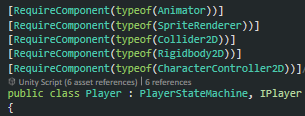 as well as some of my own, see PlayerCollision.cs.
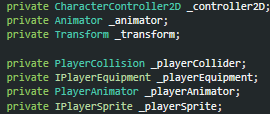
The following class' make use of the State Behavioural Pattern.
The following class' make use of the Singleton Pattern.
We have various items in the game world, that all share similar behavious. Equipment such as Sword.cs, Shield.cs and Breastplate.cs and Health being Chicken.cs, Fish.cs, Apple.cs, as well as Currency being GoldCoin.cs, Ruby.cs, Sapphire.cs. These all inherit from a base class, ItemBase.cs.
The PlayerEquipGenerator.cs will spawn the Equipment item types mentioned above, into the random generated game world. We can see inheritance being practiced here when we observe the scripts provided.
Looking further into this, we make use of this practice in the VFX used in the game world. When the player attacks and enemy or, is attacked by the enemy, you'll see "Blood Spew" VFX or, "Sprint Dust" VFX upon player running. When a player picks up equipment, you'll see VFX upon that event, or colliding with a health item, we witness VFX.
The scripts for the aformentioned VFX are as follows,
Upon inspection of these, we see that they all inherit from the BaseFX.cs. The VFX are Object Pooled in the game world and we spawn them where appropriate.
I've followed closely with these principles in DoomBreaker' development cycle.
SR is the most practiced principle in my project and have come to appreciate the simplicity of it, as well as its application. Some examples of this would be the Health Items for example, Chicken, Fish & Apple. They all make use of SR. They inherit from the same base class because they all make use of the same behaviours. However they differ in visuals and their value to the player. So they exist individually each as their own object. The AudioEventManager class, SR, it does what it's class name implies, manages audio events. The BanditCollision class, again SR, only deals with collisions that are releavnt to the Bandit enemy.
The earlier Sprite class mentioned has its base use however we have multiple uses for it. The Player.cs and enemy class', for example Bandit.cs both require use of the Sprite, however not all needs between the two are the same. We practice this principle by inherting/extending from Sprite.cs and using each use case as needed, without modifying the original. This is why we have the PlayerSprite.cs & BanditSprite.cs.
The VFX scripts that inherit from BaseFX.cs make use of Method Overriding in the Update() loop. This Method is ran from the parent class BaseFX, which in turn inherits from parent class MonoBehaviour. The Update() method in each derived class is running customised behaviours without effecting the parent class. If any one of the VFX class' that inherit from BaseFX class, were to replace one another, lets say the BloodHitFX.cs, with HealingFX.cs, there'd be no issues. This is an example of LSP.
Using Interfaces for implementing a class provides a blueprint on how that class should be constructed, by way of a contract between the two. A bloated interface with many methods could end up being unrelated to the class' that adhere to it. So we segregate and provide only what is appropriate. In DoomBreaker, instead of having a ICollision interface, that the PlayerCollision.cs or SkeletonCollision.cs class' adhere too, we segregate and implement IPlayerCollision or ISkeletonCollision. This prevents bloating ICollision with unnecessary methods that the aforementioned class' would be forced to adhere too. Take a look at IBanditCollision.cs interface. It's methods are only necessary to BanditCollision.cs.
In Unity we witness injection method for example here, in the
Barrel.cs class.
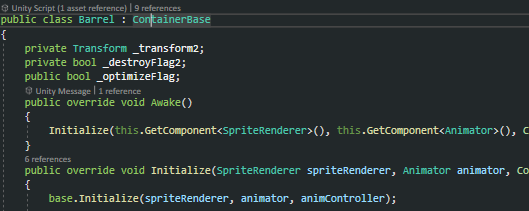
We get Unity' SpriteRenderer & Animator components and pass these through the Initialize() method args. Then assign the dependent objects to class-level variables via base.Initialize(spriteRenderer, animator, animController); within the parent class. This is decoupling class' by providing dependency from external source.
PCG is a ever increasing popular technique used today in generating worlds in video games. DoomBreaker makes use of random content generation to build its levels from the ground up, for the players to explore.
This is achieved by creating a multitude of building blocks (Prefabs in Unity) that represent various parts of the environment the player explores. In DoomBreaker we make use of the Singleton Pattern to generate the world accordingly based on the level the player is at in the game world.
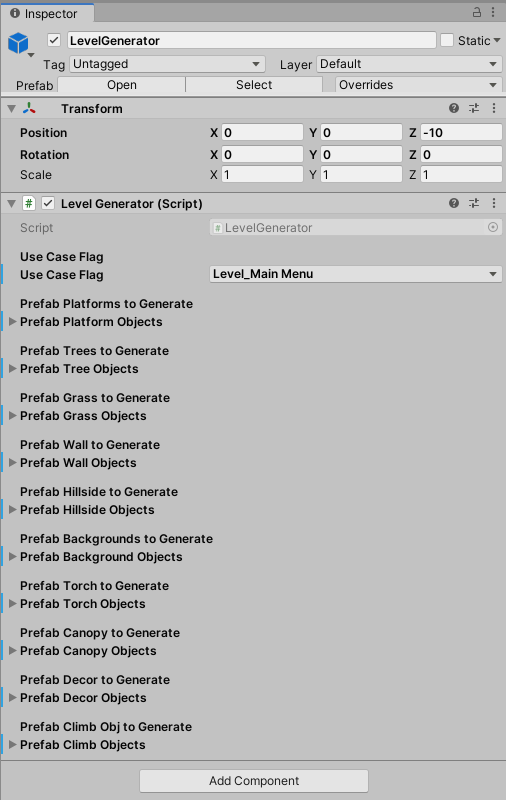
Every prefab here is used to create random patterns, of which have been through many tests, trial and error . This ensures an environment is produced differently each time and provides the player with a sense of mystery , urge to explore whilst being challenged. Lets take a look at some of the code that produces the platform the player traverses upon.
public class LevelGenerator : MonoBehaviour
{
    public static LevelGenerator _instance = null;

    [Header("Prefab Platforms to Generate")]
    [Tooltip("These must be Platform Prefabs following enum PlatformID order.")]
    public GameObject[] _prefabPlatformObjects;
    public Dictionary [PlatformID, List[GameObject]] _platformObjectsDict;

    private int _maxPlatformObjs = 400;
    private int _platformChunkCount = 5;
    private StepSizeID _stepSize;
    private PitfallSizeID _gapSize;
    public PlatformGenData _platGenData;

    private int _clusterGenMaxCount = 82;
    private int _iterationsGenMin = 20;
    private int _iterationsGenMax = 28;
    private bool _runGenerationProcess = false;
So here are some of the class variables we will be working with regarding the platform generation. We have _prefabPlatformObjects for the prefab reference, these are dragged& dropped into the inspectors script from the assets folder. We then also have _platformObjectsDict to populate the platforms we will be working with. This is a dictionary that we use enums for identifying the platform key and a list relevant to that prefab.
    void Start() => Setup();
    private void OnDisable() => Unload();
    private void Setup()
    {
        _instance = this;
        if (_prefabPlatformObjects == null) return;
        if (_platformObjectsDict == null) _platformObjectsDict = new Dictionary[PlatformID, List[GameObject]]();
        PopulatePlatformLists();
    }

    private void PopulatePlatformLists()
    {
        _platGenData.POS = _transform.position;
        _platformObjectsDict.Add(PlatformID.Platform_Forest_Ground_Earth, new List());
        _platformObjectsDict.Add(PlatformID.Platform_Forest_Bridge_Stone, new List());
        //and so on..

        if (LevelEventManager.GetLevelSelection() == LevelSelection.Level_MainMenu) _maxPlatformObjs = 50;
        if (LevelEventManager.GetLevelSelection() == LevelSelection.Level_ForestAct1) _maxPlatformObjs = 400;
        for (int i = 0; i < _maxPlatformObjs; i++)
        {
            AddPlatformObject(PlatformID.Platform_Forest_Ground_Stone);
            AddPlatformObject(PlatformID.Platform_Forest_Pitfall);
            //and so on..
        }
    }
    private void AddPlatformObject(PlatformID platformID)
    {
        GameObject newGameObject = (GameObject)Instantiate(_prefabPlatformObjects[(int)platformID]);
        newGameObject.transform.parent = _transform;
        newGameObject.SetActive(false);

        if (_platformObjectsDict.TryGetValue(platformID, out List[GameObject] listPlatforms)) listPlatforms.Add(newGameObject);
    }
We then setup these variables by intializing and populating as appropriate. We _instance = this; and do not DontDestroyOnLoad(Object target); as this script is equipped with different prefabs for each scene/level that's loaded.
In the below code snippet, we have one of the basic algorithm generating our forest environment from start to finish.
private void InitializeGeneration()
{
    switch(_useCaseFlag)
    {
        case UseCaseFlag.Level_ForestAct1:
            InitForestAct1Gen();
            break;
    }
    CleanupMemory();
}
private void InitForestAct1Gen()
{
    _stepSize = StepSizeID.Step_Size_Med;
    _gapSize = PitfallSizeID.Pitfall_Size_Med;
    _treeTypeToSpawn = TreeID.Tree_Pear_Sml;
    _platformChunkCount = 5;
    _includeTrees = true;
    _includeGrass = true;
    _includeWall = true;
    //ect..

    int j = 0;
    _iterationsGenMin = 20;
    _iterationsGenMax = 24;
    _clusterGenMaxCount = 104;
    int iterations = wildlogicgames.Utilities.GetRandomNumberInt(_iterationsGenMin, _iterationsGenMax);
    int decision = 0;


    GenerateStart();
    for (int i = 0; i < iterations; i++)
    {
        if (i < _iterationsGenMax / 4) j = wildlogicgames.Utilities.GetRandomNumberInt(0, 35); //Ensure 1/4 of level only includes specific patterns.
        else
            j = wildlogicgames.Utilities.GetRandomNumberInt(0, _clusterGenMaxCount);

        GenerateCluster(j);
        _platformChunkCount = wildlogicgames.Utilities.GetRandomNumberInt(3, 6);

        decision = wildlogicgames.Utilities.GetRandomNumberInt(0, 110);
        if (decision >= 0 && decision < 33) _treeTypeToSpawn = TreeID.Tree_Oak_Sml;
        if (decision >= 33 && decision < 66) _treeTypeToSpawn = TreeID.Tree_Pear_Sml;
        if (decision >= 66 && decision <= 110) _treeTypeToSpawn = TreeID.Tree_Oak_Med;


        if (i == iterations / 2) //Ensure checkpoint is generated midway.
        {
            Generate(PlatformID.Platform_Forest_Ground_Earth, PlatformGenFormID.Form_FlatGround);
            GenerateCheckpoint();
            Generate(PlatformID.Platform_Forest_Ground_Earth, PlatformGenFormID.Form_FlatGround);
        }
    }
    GenerateEnd();
}
Some of the variables here are self explanatory. The _platformChunkCount is responsible for defining the units of platform parts generated in methods, GenerateStart(); GenerateCheckpoint(); Generate(enum, enum); GenerateEnd(); and GenerateCluster(int);. The GenerateCluster method contains all the tested patterns that work together. The argument passed through to it, is used to select and generate a combination of platform patterns that work. The PlatformGenFormID.Form_FlatGround enum is one example of a platform pattern. See the enum below.
public enum PlatformGenFormID
{
    Form_FlatGround = 0,
    Form_FlatGroundWithGaps = 1,
    Form_CurveUp = 2,
    Form_CurveDown = 3,
    Form_StepsUp = 4,
    Form_StepsDown = 5,
    Form_Pitfall = 6,
}
Here is where we select the pattern of platforms we want to begin generating. The distance generation covers is based on the value applied to the _platformChunkCount variable.
private void Generate(PlatformID platformID, PlatformGenFormID platformGenFormID)
{
    _platGenData.currentPlatformFormID = platformGenFormID;
    switch(platformGenFormID)
    {
        case PlatformGenFormID.Form_FlatGround:
            for (int i = 0; i < _platformChunkCount; i++) GenerateFlatGround(platformID, i + 1);
            break;

        case PlatformGenFormID.Form_FlatGroundWithGaps:
            for (int i = 0; i < _platformChunkCount; i++) GenerateFlatGroundWithPitfalls(platformID, _gapSize, i + 1);
            break;

        case PlatformGenFormID.Form_Pitfall:
            //for (int i = 0; i < _platformChunkCount; i++) GenerateFlatPitfall(i + 1);
            GenerateFlatPitfall(0 + 1);
            break;

        case PlatformGenFormID.Form_CurveUp:
            for (int i = 0; i < _platformChunkCount; i++) GenerateSlopeUpToFlatGround(platformID, i + 1);
            break;

        case PlatformGenFormID.Form_CurveDown:
            for (int i = 0; i < _platformChunkCount; i++) GenerateSlopeDownToFlatGround(platformID, i + 1);
            break;

        case PlatformGenFormID.Form_StepsUp:
            for (int i = 0; i < _platformChunkCount; i++) GenerateStepsUpToFlatGround(platformID, _stepSize, i + 1);
            break;

        case PlatformGenFormID.Form_StepsDown:
            for (int i = 0; i < _platformChunkCount; i++) GenerateStepsDownToFlatGround(platformID, _stepSize, i + 1);
            break;
    }
    _platGenData.previousPlatformFormID = platformGenFormID;
}
The _platGenData variable is a struct that we use whilst building the selected platform pattern. It aids the generation process, helping each part is connected appropriately.
Lets take a look at the GenerateSlopeUpToFlatGround(enum, int) method.
private void GenerateSlopeUpToFlatGround(PlatformID localPlatformID, int i)
{

    if (_platGenData.newGenChain)
    {
        _platGenData.POS = _platGenData.NEXT_POS;
        _platGenData.POS.y += _platGenData.PREV_HEIGHT;
        _platGenData.newGenChain = false;
    }

    Vector3 randPosition = _platGenData.POS;
    randPosition.z = 10;
    GameObject obj = GetPlatformObject(localPlatformID);
    if (obj == null)
    {
        //print("\nPlatform Generator= GetPlatformObject() returned null.");
        return;
    }
    obj.SetActive(true); //Must be active before GetComponent().bounds.extents; is called!
In the above we first identify whether or not this is the start of a new pattern generation. If it is, then apply its starting position appropriately and flag the beginning of new pattern. Next, we retrieve the relevant platform part and enable it. GameObjects must be active for certain changes applied to it or its components to take effect.
    float platformWidth = GetPlatformObjectWidth(localPlatformID, obj);
    float x = randPosition.x + (platformWidth * i);
    float platformHeight = GetPlatformObjectHeight(localPlatformID, obj);
    float y = randPosition.y - (platformHeight / i);


    if (_platGenData.previousPlatformID == PlatformID.Platform_Forest_Bridge_Stone)
        _platGenData.POS.y += platformHeight / 2; //(_platGenData.bridgeObjBounds.y);

    _platGenData.POS = randPosition;
    randPosition = new Vector3(x, y, randPosition.z);
    obj.transform.position = randPosition;

    IncludeEquipmentSpawnPos(randPosition);
    IncludeGoblinSpawnPos(randPosition);
    IncludeTreeGeneration(localPlatformID, i, x, platformHeight, randPosition.z, randPosition, false);
    IncludeTorchGeneration(localPlatformID, i, x, platformHeight, randPosition.z, 1, randPosition);
    IncludeMovePlatformDest(randPosition);

    for (int j = 0; j < 3; j++) IncludeGrassGeneration(localPlatformID, i, x, platformHeight, randPosition.z, j + 1, randPosition, false);
    for (int j = 0; j < 2; j++) IncludeWallGeneration(localPlatformID, i, x, platformHeight, randPosition.z, j + 1, randPosition);

    int rand = wildlogicgames.Utilities.GetRandomNumberInt(0, 100);
    if (rand > 66) IncludeDecorGeneration(localPlatformID, i, x, platformHeight, randPosition.z,
    wildlogicgames.Utilities.GetRandomNumberInt(0, 1) + 1, randPosition);

    if (i <= _platformChunkCount - 1)
    {
        IncludeGrassGeneration(localPlatformID, i, x, platformHeight, randPosition.z, 1, randPosition, true);
        IncludeTreeGeneration(localPlatformID, i, x, platformHeight, randPosition.z, randPosition, true);
    }
We then get the current platform' dimensions, calculate the position to spawn at and apply. You'll also see we can factor in a bunch of other elements to include in the generation process.
    _platGenData.BlockIncrement++;
    _platGenData.previousPlatformID = localPlatformID;

    if (i == _platformChunkCount )
    {
        _platGenData.NEXT_POS = obj.transform.position;
        _platGenData.PREV_HEIGHT = platformHeight;
        _platGenData.newGenChain = true;
    }
}
The method ends with incrementing the unit' generated and recording its type for future reference in the generation chain process. If this is the last unit to be generated in the pattern, then we record its position, height and flag it complete.
Ok, so what do some of these mechanics and game elements look like under the hood? Lets take a look at some of the base foundation of what's here. The player.
Each player inherits from the PlayerStateMachine.cs, which in turn, inherits-implements the abstract class, StateMachine.cs. This class has one member contained within itself, a protected BaseState.cs and of course a SetState() method. We follow through with the Object Oriented approach for implementing a finite state machine. So for each state we want the player to have, we exercise polymorphism by creating a class from the BaseState.cs, tailored for each behaviour. To name a few, would be PlayerIdle.cs, PlayerMoving.cs and PlayerJump.cs. Lets take a look at a few of the cogs in this machine.
This class is responsible for structure of our Player State Machine. I've made it abstract, so we use this kind of as a contract to different state machines that implement it. All state machines will require a base state member and a way of setting the next state. Very simple. Just a state to identify, & apply.
using UnityEngine;

namespace DoomBreakers
{
public abstract class StateMachine : MonoBehaviour
{
    protected BaseState _state; //So we delegate behaviours down to the state.

    public void SetState(BaseState state) => _state = state;
    //{
    //  _state = state;
    //}

    //public BaseState GetState() => _state;//Evil yet here we are.

}
}
We then follow on through by implementing the StateMachine for use with the Player class.
using System;
using UnityEngine;

namespace DoomBreakers
{
public class MyPlayerStateMachine : StateMachine
{
    protected Vector3 _velocity;

    protected bool SafeToSetJump()
    {
        if (_state.GetType() != typeof(PlayerJump) &&
            _state.GetType() != typeof(PlayerGainedEquipment))
            return true;

        return false;

    }
    protected bool IsDefendingSelf()
    {
        if (_state.GetType() == typeof(PlayerDefend))
            return true;
        return false;
    }
    protected bool IsIgnoreDamage()
    {
        if (_state.GetType() == typeof(PlayerDodge))
            return true;
        if (_state.GetType() == typeof(PlayerDodged))
            return true;
        return false;
    }
}
}
The Player class inherits this State Machine. So what does this look like?
namespace DoomBreakers
{

[RequireComponent(typeof(Animator))]
[RequireComponent(typeof(SpriteRenderer))]
[RequireComponent(typeof(Collider2D))]
[RequireComponent(typeof(Rigidbody2D))]
[RequireComponent(typeof(Controller2D))]
public class Player : MyPlayerStateMachine, IPlayer
{
    [Header("Player ID")]
    [Tooltip("ID ranges from 0 to 3")]  //Max 4 players.
    public int _playerID;               //Set in editor per player.

    [Header("Player Attack Points")]
    [Tooltip("Vectors that represent point of attack radius")]
    public Transform[] _attackPoints; //1=quickATK, 2=powerATK, 3=upwardATK

    private Rewired.Player _rewirdInputPlayer;
    private Vector2 _inputVector2;
    private Controller2D _controller2D;
    private Animator _animator;

    private IPlayerCollision _playerCollider;
    private IPlayerEquipment _playerEquipment;
    private IPlayerAnimator _playerAnimator;
    private IPlayerSprite _playerSprite;

    private Action _actionListener;

    private void InitializePlayer()
    {
        SetState(new PlayerIdle(this, _inputVector2)); //USING STATE MACHINE HERE

        _controller2D = this.GetComponent[Controller2D]();
        _rewirdInputPlayer = ReInput.players.GetPlayer(_playerID);
        _inputVector2 = new Vector2();
        _animator = this.GetComponent[Animator]();

        _playerCollider = this.gameObject.AddComponent[PlayerCollision]();
        _playerCollider.Setup(this.GetComponent[Collider2D](), ref _attackPoints);
        _playerEquipment = new PlayerEquipment();
        _playerAnimator = new PlayerAnimator(this.GetComponent[Animator]());
        _playerSprite = this.gameObject.AddComponent[PlayerSprite]();
        _playerSprite.Setup(this.GetComponent[SpriteRenderer](), _playerID);
        _actionListener = new Action(AttackedByBandit);//AttackedByBandit()
    }
}
}
We then update the state machines, base state behaviours in the Unity Update() loop.
void Update()
{
UpdateInput();
UpdateStateBehaviours();
UpdateCollisions();
}
public void UpdateStateBehaviours()
{
_state.IsIdle(ref _animator);
_state.IsGainedEquipment(ref _animator, ref _playerSprite, ref _playerEquipment);
_state.IsMoving(ref _animator, ref _inputVector2, ref _playerSprite, ref _playerCollider);
_state.IsJumping(ref _animator, ref _controller2D, ref _inputVector2);
_state.IsFalling(ref _animator, ref _controller2D, ref _inputVector2);
_state.IsDodging(ref _animator, ref _controller2D, ref _inputVector2, _inputDodgedLeft, ref _playerSprite, ref _playerCollider);
_state.IsDodged(ref _animator, ref _controller2D, ref _inputVector2);
_state.IsQuickAttack(ref _animator, ref _playerSprite, ref _inputVector2, ref _quickAttackIncrement);
_state.IsUpwardAttack(ref _animator, ref _playerSprite, ref _inputVector2);
_state.IsKnockAttack(ref _animator, ref _playerSprite, ref _inputVector2);
_state.IsHoldAttack(ref _animator, ref _playerSprite, ref _inputVector2);
_state.IsReleaseAttack(ref _animator, ref _playerSprite, ref _inputVector2);
_state.IsDefending(ref _animator, ref _inputVector2);
_state.IsHitBySmallAttack(ref _animator, ref _playerSprite, ref _inputVector2);
_state.UpdateBehaviour(ref _controller2D, ref _animator);
}
We can make more sense out of the above by taking a look at the BaseState.cs and inheriting class'.
This class is responsible for acting as the base to all our states that we create and derive from. We have all the needed variables that will be required between the various player states, along side the Methods that each will override as appropriate.
using UnityEngine;

namespace DoomBreakers
{
public class BaseState : MonoBehaviour
{
    //[summary]
    //All these variables are required for the various Player Behaviours.
    //So we embody them within a state and use as appropriate with each
    //dervived player state we create and set.
    //[/summary]

    protected StateMachine _stateMachine;
    protected Vector3 _velocity;
    protected const float _maxJumpVelocity = 12.0f;
    protected float _targetVelocityX, _moveSpeed, _sprintSpeed, _jumpSpeed, _gravity;
    protected int _quickAttackIncrement; //4+ variations of this animation.
    protected bool _dodgedLeftFlag;

    protected float _quickAtkWaitTime, _gainedEquipWaitTime;
    protected ITimer _behaviourTimer;

    public BaseState(Vector3 velocity)
    {
        _velocity = velocity;
        _moveSpeed = 4.0f;//3.75f;//3.5f;
        _sprintSpeed = 1.0f;
        _targetVelocityX = 1.0f;
        _jumpSpeed = 4.6f;// 4.0f;
        _gravity = wildlogicgames.DoomBreakers.GetGravity();
        _quickAttackIncrement = 0;
        _dodgedLeftFlag = false;
        _quickAtkWaitTime = 0.133f;
        _gainedEquipWaitTime = 1.5f;
    }
    public virtual void UpdateBehaviour(ref Controller2D controller2D, ref Animator animator)
    {
        UpdateGravity(ref controller2D, ref animator);
        UpdateTransform(ref controller2D);
    }
    private void UpdateTransform(ref Controller2D controller2D) {}
    private void UpdateGravity(ref Controller2D controller2D, ref Animator animator) {}
    public virtual void IsIdle(ref Animator animator) { }
    public virtual void IsGainedEquipment(ref Animator animator, ref IPlayerSprite playerSprite, ref IPlayerEquipment playerEquipment) { }
    public virtual void IsMoving(ref Animator animator, ref Vector2 input, ref IPlayerSprite playerSprite, ref IPlayerCollision playerCollider) { }
    public virtual void IsJumping(ref Animator animator, ref Controller2D controller2D, ref Vector2 input) { }
    public virtual void IsFalling(ref Animator animator, ref Controller2D controller2D, ref Vector2 input) { }
    public virtual void IsDodging(ref Animator animator, ref Controller2D controller2D, ref Vector2 input,
                                    bool dodgeLeft, ref IPlayerSprite playerSprite, ref IPlayerCollision playerCollider) { }
    public virtual void IsDodged(ref Animator animator, ref Controller2D controller2D, ref Vector2 input) { }
    public virtual void IsQuickAttack(ref Animator animator, ref IPlayerSprite playerSprite, ref Vector2 input, ref int quickAttackIncrement) { }
    public virtual void IsUpwardAttack(ref Animator animator, ref IPlayerSprite playerSprite, ref Vector2 input) { }
    public virtual void IsKnockAttack(ref Animator animator, ref IPlayerSprite playerSprite, ref Vector2 input) { }
    public virtual void IsHoldAttack(ref Animator animator, ref IPlayerSprite playerSprite, ref Vector2 input) { }
    public virtual void IsReleaseAttack(ref Animator animator, ref IPlayerSprite playerSprite, ref Vector2 input) { }
    public virtual void IsDefending(ref Animator animator, ref Vector2 input) { }
    public virtual void IsHitBySmallAttack(ref Animator animator, ref IPlayerSprite playerSprite, ref Vector2 input) { }
}
}
Note, back in the Unity Update() loop UpdateStateBehaviours() we have all of the possible state methods called. However, because we only implement the one required Method per Player State class, the others will not be overriden and the call will lead back to the empty virtual Method. When we make the SetState(...) call in the below,
public void UpdateCollisions()
{
_playerCollider.UpdateCollision(ref _state, _playerID, ref _playerEquipment, ref _playerSprite);
if(_playerEquipment.NewEquipmentGained())
{
    SetState(new PlayerGainedEquipment(this, _velocity));
    _playerAnimator.SetAnimatorController(ref _playerEquipment);
    _playerEquipment.NewEquipmentGained(false);
}
}
We are creating a new PlayerGainedEquipment.cs state object and setting this as the current state. So _state.IsGainedEquipment(...) call is the only one that will be overidden and executed. Lets take a look at how the PlayerIdle.cs class works.
We inherit from the BaseState class and have a contract with the PlayerIdle Interface. We pass on the state machine through the constructor for convienience. This way we are able to carry on a state change from within the current state itself. Notice here, we have simply implemented the only Method that is relevant to us here, IsIdle().
using UnityEngine;
namespace DoomBreakers
{
public class PlayerIdle : BaseState, IPlayerIdle
{
    public PlayerIdle(StateMachine s, Vector3 v) : base(velocity: v)//=> _stateMachine = s;
    {
        _stateMachine = s;
        _velocity = v; //We want to carry this on between states.
        print("\nIdle State.");
    }
    public override void IsIdle(ref Animator animator)
    {
        animator.Play("Idle");//, 0, 0.0f);
        _velocity.x = 0f;
        if (Mathf.Abs(_velocity.y) >= 3.0f)
            _stateMachine.SetState(new PlayerFall(_stateMachine, _velocity));
        //base.UpdateBehaviour();
    }
}
}
Now for good measure we'll take a look at the other player states listed earlier.
Here we have a similar way of implementing the player move state but of course it's logic is different as appropriate.
using UnityEngine;

namespace DoomBreakers
{
public class PlayerMove : BaseState, IPlayerMove
{
    public PlayerMove(StateMachine s, Vector3 v) : base(velocity: v)//=> _stateMachine = s;
    {
        _stateMachine = s;
        _velocity = v; //We want to carry this on between states.
        print("\nMove State.");
    }

    public override void IsMoving(ref Animator animator, ref Vector2 input, ref IPlayerSprite playerSprite, ref IPlayerCollision playerCollider)
    {
        animator.Play("Run");
        _velocity.x = (input.x * (_moveSpeed * _sprintSpeed));
        DetectFaceDirection(ref playerSprite, ref playerCollider);
        print("\nplayerSprite.GetSpriteDirection()=" + playerSprite.GetSpriteDirection());
        if (Mathf.Abs(_velocity.y) >= 3.0f)
            _stateMachine.SetState(new PlayerFall(_stateMachine, _velocity));
        //base.UpdateBehaviour();
    }

    private void DetectFaceDirection(ref IPlayerSprite playerSprite, ref IPlayerCollision playerCollider)
    {
        if (_velocity.x < 0f)
        {
            if (playerSprite.GetSpriteDirection() == 1)//Guard clause,only flip once.
            {
                playerSprite.FlipSprite();
                playerCollider.FlipAttackPoints(-1);
            }
            return;
        }
        if (_velocity.x > 0f)
        {
            if (playerSprite.GetSpriteDirection() == -1)
            {
                playerSprite.FlipSprite();
                playerCollider.FlipAttackPoints(1);
            }
            return;
        }
    }
}
}
The PlayerJump.cs state is nice and small.
using UnityEngine;

namespace DoomBreakers
{
public class PlayerJump : BaseState, IPlayerJump
{
    public PlayerJump(StateMachine s, Vector3 v) : base(velocity: v)//=> _stateMachine = s;
    {
        _stateMachine = s;
        _velocity = v; //We want to carry this on between states.
        //_behaviourTimer = new Timer();
        print("\nJump State.");
    }
    public override void IsJumping(ref Animator animator, ref Controller2D controller2D, ref Vector2 input)
    {
        animator.Play("Jump");//, -1, 0.0f);
        _velocity.y += _jumpSpeed;
        _velocity.x = (input.x * (_moveSpeed * _sprintSpeed));
        if (_velocity.y >= _maxJumpVelocity)//(_maxJumpVelocity / 1.15f)) //Near peak of jump velocity, set falling state.
                _stateMachine.SetState(new PlayerFall(_stateMachine, _velocity));

        //base.UpdateBehaviour();
    }
}
}
There's more to it than this but this is the genreal principle behind how it is working. A similar approach has been taken in regards to enemy AI. You can take a closer look at the code for this over at my github page.